


Problem
Document creation lacks an intuitive workflow Experience now: right now when I create a document we have a 0 intuitive experience:
I Tap create document button in the sidebar. This creates a Draft with no location (this is not clear at all)
I tap publish and it asks me to select location
Even if I already selected location I need to go to directory to find it (impossible to understand this). The document is not visible in the document content on the location selected and this is confusing
Solution
The other ways to create documents are not clear nor visible. so we need to have less ways and more clear ways to create documents, specially with the location selected.
We also need to make sure that when we create a document, it will be added as a link to the current location parent document so it will be easily findable.
Tasks
remove the create document button in the sidebar
add the dropdown to create a private document only on the home document. This is because of the temporary decision to have private documents with no location.
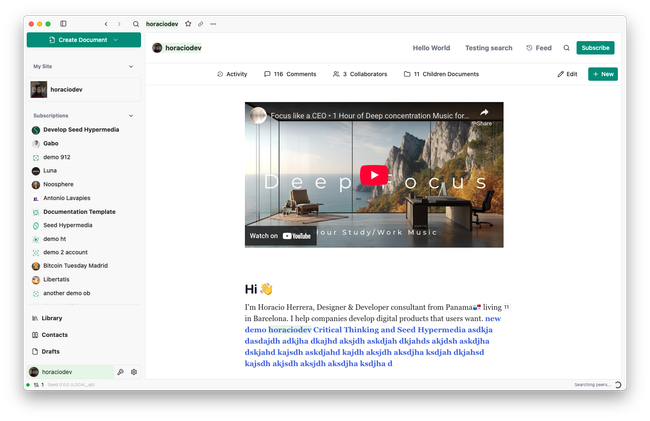
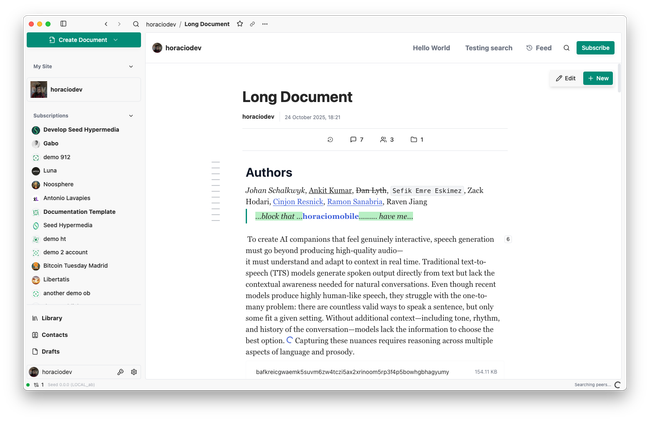
add the new document button as shown in the screenshots above
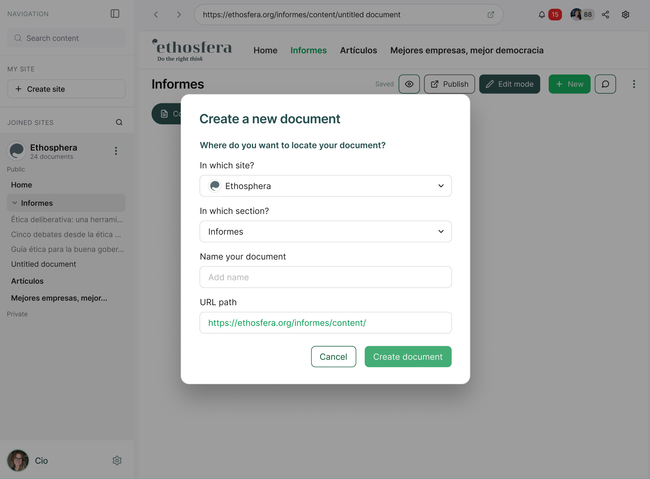
When the user presses the "new document" button, we should show a dialog that shows both the location and also the resulted URL for that document before the user starts editing.
after publishing a document, we need to add at the bottom a document card of the new document created to the parent document.
Scope
1 week
Rabbit Holes
Nested Drafts
We need to be careful with this because we need to be clear that if the user publishes the parent draft with nested drafts in it, it should be clear the nested drafts wont be visible unil they are published.
The same thing if users want to publish a nested draft before a parent draft. In this case I believe we need to prompt the user and telling them that if they want foo/bar to be published, they must publish foo first or we can even publish both at the same time.
what if I remove the document card to a subdocument that was not published? should we remove the draft to the subdocument not published?
hm://z6MkrbYsRzKb1VABdvhsDSAk6JK8fAszKsyHhcaZigYeWCou and hm://z6Mkvz9TgGtv9zsGsdrksfNk1ajbFancgHREJEz3Y2HsAVdk were discussing of a feature to sort list of documents in the draft by any parameter (activity, create time, update time...). the problem with this is that this change will be locked in time based on the values when the draft was made. if the users want this sorting to become "Live" then we need to change the list to a query block. What is the problem here is that subsequent subdocuments created, will be added both to the bottom of the parent document content AND also inside the query block. Maybe in this case we need to be smarter and only add the document card to the parent document IF there's no query block of itself in the content.
No-Gos
What if we delete one subdocument? should we remove the document card from the parent?
I believe we should do nothing about deleting documents that are removed from its parent, but maybe I'm wrong and we need to do it anyways.
Do you like what you are reading? Subscribe to receive updates.
Unsubscribe anytime